
Secure Comparison Guide: Browser-Based File Protection
Discover how FileDiffs uses browser-local processing to compare files securely. All analysis happens directly in your browser without server uploads or cloud storage, helping protect sensitive documents while delivering fast and accurate comparisons across 60+ file formats.
When comparing files online, one of the biggest concerns is how documents are processed behind the scenes. Many comparison tools rely on remote infrastructure where files are uploaded and analyzed externally before results are returned. For sensitive documents, this creates unnecessary privacy and compliance concerns.
FileDiffs takes a different approach by performing file comparison directly inside your browser session. Files remain on your device throughout the process, helping reduce exposure risks while maintaining fast and accurate comparison performance.
Why External File Processing Can Create Privacy Risks
Traditional online comparison tools often depend on server-side processing. This means your files may be transferred to external systems for analysis before results are generated.
For confidential documents such as contracts, financial reports, research data, legal records, or proprietary source code, external processing can introduce avoidable security concerns.
Common Risks of Cloud-Based File Comparison
- →Data Exposure Risks: Uploading files to external systems can increase the risk of unauthorized access, accidental exposure, or security vulnerabilities.
- →Limited Transparency: Some platforms may temporarily retain uploaded data for analytics, debugging, or service optimization purposes.
- →Compliance Challenges: Organizations handling regulated or confidential information may need stricter control over how documents are processed and stored.
- →Reduced User Control: Once files are uploaded, users have limited visibility into how long data is retained or how it is handled internally.
- →Network Dependency: Server-based comparison tools may experience delays caused by uploads, unstable internet connections, or remote infrastructure latency.
Browser-Local Processing with FileDiffs
FileDiffs performs comparisons locally inside your browser instead of relying on external processing infrastructure. This browser-local architecture helps reduce privacy risks while giving users more control over sensitive documents.
Because files are processed within the browser session itself, documents are not uploaded to remote servers during comparison.
Benefits of Browser-Based File Comparison
- →Local File Handling: Files remain on your device throughout the comparison process, helping reduce unnecessary exposure to external systems or third-party infrastructure.
- →Fast Real-Time Results: Browser-local processing reduces delays caused by file uploads and remote server communication, allowing comparisons to start instantly.
- →Privacy-Focused Workflow: Since analysis happens directly inside your browser session, there is no reliance on external cloud storage or remote processing systems.
- →Greater Data Control: Users maintain direct control over sensitive documents during the entire comparison workflow without depending on external platforms.
- →Reduced Cloud Exposure: Eliminating remote uploads helps minimize common privacy and security concerns associated with cloud-based file processing tools.
How FileDiffs Works
Understanding how browser-based comparison works helps explain why local processing can improve privacy and responsiveness.
FileDiffs uses advanced diffing algorithms and modern browser technologies such as WebAssembly (WASM) to analyze files directly inside your browser environment. This allows the platform to process documents, spreadsheets, and code files efficiently without relying on server-side analysis.
- Open FileDiffs in Your Browser
FileDiffs works directly in modern browsers without requiring software installation or complex setup. You can begin comparing files immediately from your browser session.
- Select or Drag and Drop Files
Choose the files you want to compare from your device. FileDiffs supports a wide range of formats including:
All selected files remain inside your local browser session during processing.
- Review Differences in Detail
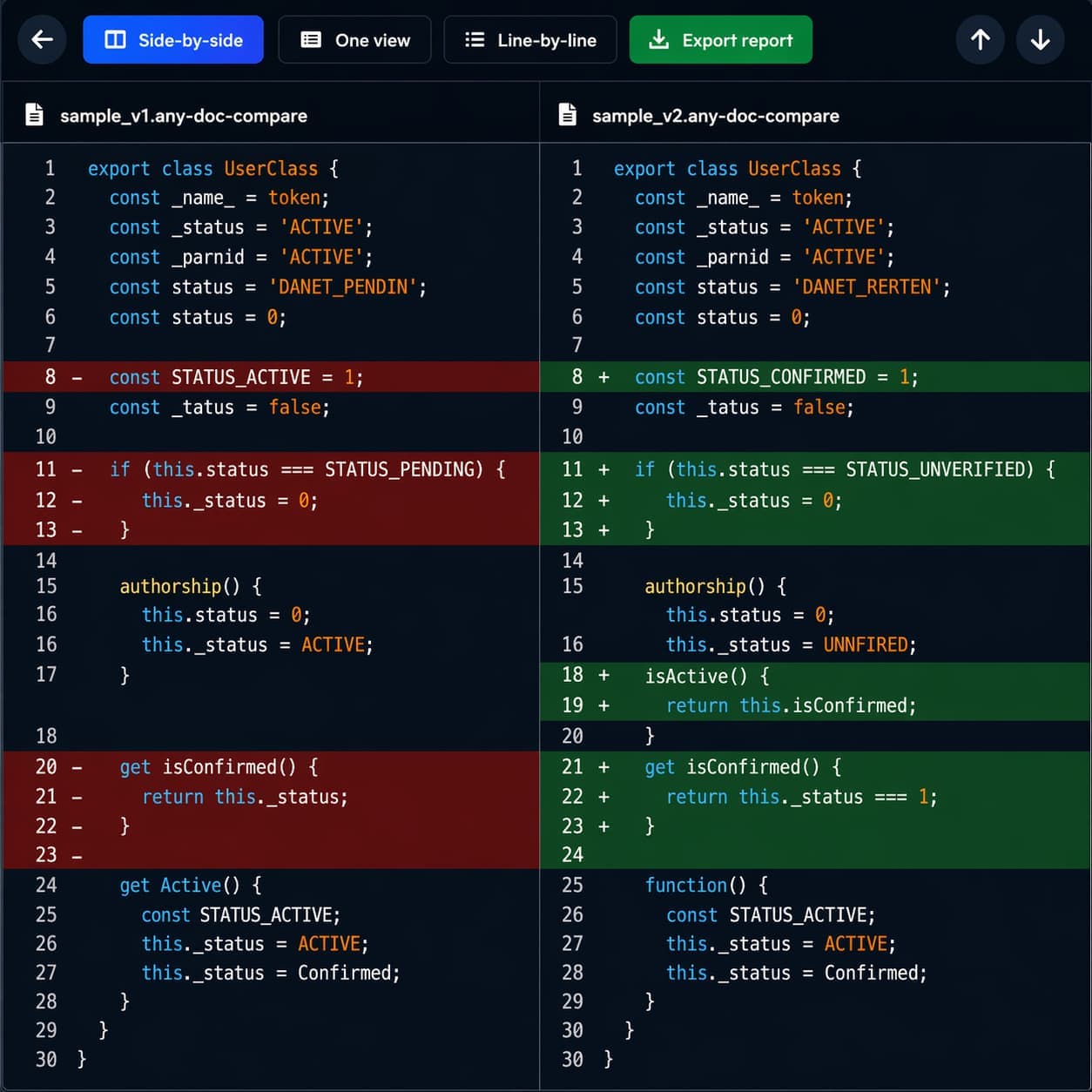
Once files are loaded, FileDiffs highlights additions, deletions, and modifications using multiple comparison views. Available comparison modes include:
- Side-by-Side View: Displays the original and modified files next to each other in two vertical panels, highlighting changes horizontally. Ideal for comparing code structure, document layouts, and spreadsheets.
- Line-by-Line View: Shows changes sequentially in a vertical list, presenting deleted lines directly followed by inserted lines. Useful for tracking code edits and reading dense text diffs linearly.
- Unified View: Merges both versions into a single pane, presenting additions and deletions inline with color-coded highlights. Provides a compact overview of changes in context without splitting the screen.
These layouts help users quickly identify document, spreadsheet, or code changes with precision.
- Analyze or Export Results
After reviewing changes, users can use the comparison output for validation, auditing, reporting, or collaboration workflows. Enterprise workflows may also benefit from exportable change reports for documentation and review purposes.
Supported File Formats
FileDiffs supports more than 60 file types across documents, spreadsheets, structured data, and source code. The comparison engine adapts its logic based on file structure and formatting, helping generate more meaningful and accurate results across all supported types.
- Documents: PDF, Word (DOCX), DOCX, ODT, RTF, TXT, Markdown (MD)
- Data & Spreadsheets: Excel (XLSX), CSV, TSV, JSON, XML, YAML, TOML
- Programming & Web: JavaScript, TypeScript, Python, HTML, CSS, SCSS, PHP, Ruby, Java, C, C++, C#, Go, Rust, Swift, Kotlin, Shell, SQL
- Databases & Systems: SQLite, ENV files, INI, LOG, and more
All processing occurs locally in your browser session to help maintain document privacy across every supported format.
Comparison with Traditional File Comparison Tools
Secure File Comparison Glossary
Browser-Local Processing
Browser-local processing is a privacy-focused architecture where file comparison and document analysis occur directly inside the user's web browser instead of on remote servers or external cloud infrastructure. Unlike traditional online comparison tools that require file uploads for processing, browser-local processing keeps documents on the user's device throughout the entire workflow, helping reduce privacy risks associated with transmitting sensitive files across external networks. This approach is especially useful for confidential documents, legal contracts, financial records, research data, and proprietary source code where data control is important. FileDiffs uses browser-local processing to deliver secure file comparison with fast real-time performance across documents, spreadsheets, structured data, and code files.
Advanced Diff Algorithm
An advanced diff algorithm is a specialized comparison engine designed to detect additions, deletions, formatting updates, and structural modifications between two versions of a file with high precision. FileDiffs uses optimized word-level and line-level diffing techniques to analyze documents, spreadsheets, and source code across multiple file formats, helping users identify even small changes accurately. This technology supports document review, version comparison, auditing workflows, and source code analysis.
Zero-Retention Policy
A zero-retention policy is a privacy-focused approach where user files and comparison data are not intentionally stored, logged, or permanently retained after processing is completed. In browser-based comparison workflows, this means files are analyzed temporarily within the local browser session instead of being uploaded and archived on remote infrastructure. FileDiffs is designed around browser-local processing principles that help users maintain greater visibility and control over sensitive files during the comparison process.
WebAssembly (WASM)
WebAssembly (WASM) is a modern browser technology that enables high-performance application processing directly inside web browsers without requiring traditional desktop software or external server-side execution. It allows computationally intensive tasks such as document parsing, file analysis, structured data processing, and code comparison to run at near-native speed within the browser environment. FileDiffs uses WebAssembly to improve comparison performance across documents, spreadsheets, structured data, and source code while reducing delays commonly associated with cloud uploads and remote processing systems.
Why FileDiffs Is Different
Many online comparison tools rely on remote infrastructure for file analysis. FileDiffs instead focuses on browser-local processing to help reduce unnecessary exposure of sensitive documents.
This architecture is designed for users who prioritize:
- Privacy-focused workflows
- Faster local comparison performance
- Reduced reliance on cloud uploads
- Greater control over sensitive files
By processing files locally inside the browser, FileDiffs provides a simpler and more transparent approach to secure file comparison. About our Privacy Standards · Privacy Policy
Frequently Asked Questions
Browser-local file comparison analyzes files directly inside your browser instead of uploading them to remote servers. Files stay on your device throughout, reducing external exposure risks and giving you more control over sensitive documents.
Use a format-aware comparison tool that supports line-level and word-level views. FileDiffs highlights additions, deletions, and modifications across documents, spreadsheets, and source code with precision across 60+ file types.
Browser-based comparison eliminates upload delays and server round-trips. Local processing starts immediately after files are loaded, making comparisons feel near-instant compared to cloud-based tools.
Prioritize browser-local processing, transparent privacy practices, minimal data retention, and support for sensitive document workflows. Avoid tools that upload files to external servers without clear disclosure.
Yes. FileDiffs suits developers, legal teams, analysts, and researchers needing a privacy-focused way to compare documents, spreadsheets, and code — without relying on cloud infrastructure.